Hi,
Setup:
- Nginx is acting as a reverse proxy
- SSL is terminated on Nginx
- Backend is Microsoft IIS
- Communication between Nginx and IIS is over HTTP
- The client accesses the site over HTTPS
- Backend application (ASP.NET) uses secure cookies on login
My issue:
-
The website loads fine initially
-
On login attempt, the client enters an infinite redirect loop
-
I suspect this happens when the application attempts to issue a secure cookie, but since the backend only sees an HTTP request, the cookie isn’t properly handled
-
When I change the internal Nginx → IIS connection to HTTPS, the problem disappears
Solutions I’ve tried:
I’m sending the standard header from the proxy:
proxy_set_header X-Forwarded-Proto $scheme;
(and all other headers listed below).
On the IIS side, I have configured the server variables and a rewrite rule as shown in the attached screenshot.
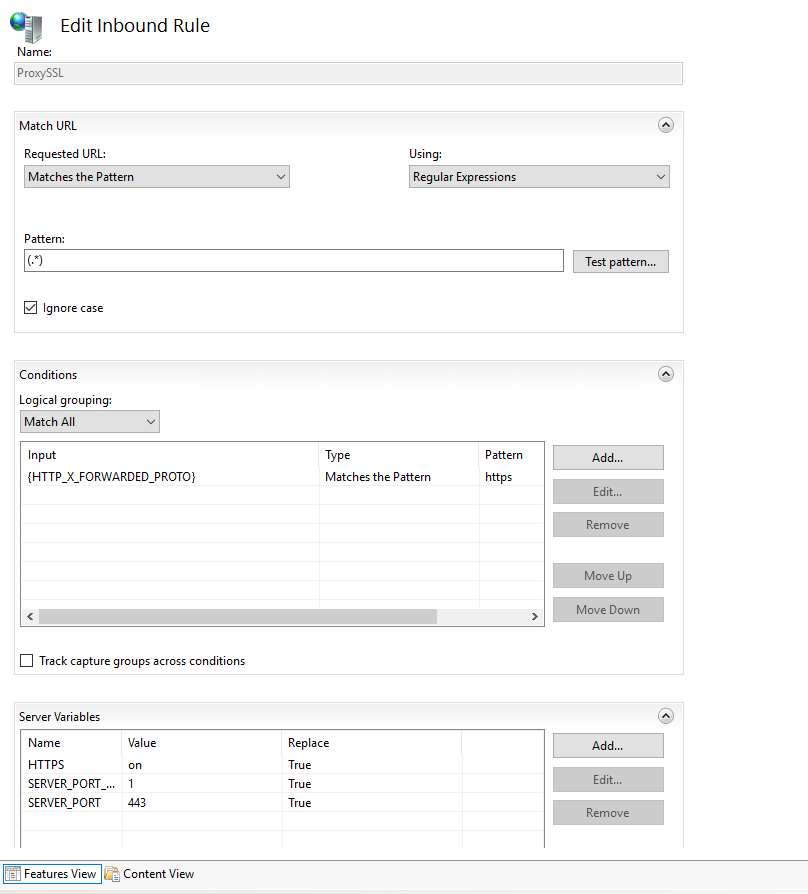
This setup should make IIS / the application treat the communication as if it were over HTTPS — but obviously, that’s not happening.
I discovered a workaround, where I add the following code into Global.asax of the application:
protected void Application_BeginRequest(object sender, EventArgs e)
{
    var proto = HttpContext.Current.Request.Headers["X-Forwarded-Proto"];
    if (string.Equals(proto, "https", StringComparison.OrdinalIgnoreCase))
    {
        var sv = HttpContext.Current.Request.ServerVariables;
        sv.Set("HTTPS", "on");
        sv.Set("SERVER_PORT_SECURE", "1");
        sv.Set("SERVER_PORT", "443");
    }
}
This code essentially does what the rewrite rule should be doing — it makes the application aware of the X-Forwarded-Proto header and respect it.
With this workaround in place, everything works correctly.
BTW you can see ModSecurity in config, but it’s in DetectionModeOnly and I’m sure it does not interfere.
Version of NGINX or NGINX adjacent software (e.g. NGINX Gateway Fabric):
nginx/1.24.0
IIS v 10.*
NGINX Config and proxy_params
Config
server {
listen 80;
server_name demo.mysite.com;return 301 https://$host$request_uri;}
server {
listen 443 ssl;
listen [::]:443 ssl;
server_name demo.mysite.com;ssl_certificate /etc/nginx/ssl/HT.pem; ssl_certificate_key /etc/nginx/ssl/HT.key; ssl_protocols TLSv1.2 TLSv1.3; ssl_ciphers HIGH:!aNULL:!MD5; modsecurity on; modsecurity_rules_file /etc/nginx/modsecurity.conf; location / { proxy_pass http://192.168.20.50; include /etc/nginx/proxy_params; proxy_ssl_verify off; proxy_ssl_server_name on; proxy_ssl_name $host; }}
proxy_params
proxy_set_header Host $host;
proxy_set_header X-Real-IP $remote_addr;
proxy_set_header X-Forwarded-For $proxy_add_x_forwarded_for;
proxy_set_header X-Forwarded-Proto $scheme;
proxy_set_header X-Forwarded-Host $host;
proxy_set_header X-Forwarded-Port $server_port;
proxy_set_header X-Forwarded-Server $host;proxy_set_header X-Request-ID $request_id;
proxy_http_version 1.1;
proxy_set_header Upgrade $http_upgrade;
proxy_set_header Connection “Upgrade”;proxy_set_header Accept-Encoding “”;
proxy_hide_header X-Powered-By;
proxy_hide_header Server;proxy_connect_timeout 5s;
proxy_send_timeout 60s;
proxy_read_timeout 60s;proxy_intercept_errors on;
proxy_request_buffering off;
proxy_buffering off;proxy_set_header X-Local-Time $time_iso8601;
I can provide access and error logs, as well as browser console output — but there’s nothing particularly interesting there, just the infinite redirect loop.
Any advice is appreciated, thanks.